- In the EU and UK, non-essential cookies need consent that is freely given, specific, informed, unambiguous and as easy to withdraw as to give.
- Regulators treat a missing Reject button, pre-ticked boxes, hidden reject links and misleading button design as ways to get invalid consent.
- In the US the default is different: most state laws let you track first and require an easy opt-out, including respect for Global Privacy Control in some states.
The core cookie banner rules are simple: do not set non-essential cookies before the visitor agrees, show Reject as clearly as Accept on the first screen, and explain what each choice does. Visitors must also be able to change their mind as easily as they said yes, and you should be able to prove what each visitor chose.
Every other cookie banner rule, from colours to cookie walls, follows from those principles. Below: what European regulators have said, the design tricks they have fined, and what changes in the UK and the US.
What valid consent means under the GDPR
The cookie rule itself comes from the ePrivacy Directive (Article 5(3)) and the national laws based on it. It says you need consent before storing or reading information on a visitor’s device, unless it is strictly necessary for a service the visitor asked for. What counts as “consent” comes from the GDPR, and that is where the real requirements are.
Under Article 4(11) and Article 7 of the GDPR, consent must be:
- Freely given. The visitor has a real choice and is not punished or pressured for saying no.
- Specific. Consent is given per purpose. “Analytics” and “advertising” are different purposes, so a single vague “we use cookies to improve your experience” does not cover both.
- Informed. The visitor knows who is asking, what for, and which outside services are involved before choosing.
- Unambiguous. It takes a clear, active step, such as clicking a button. Silence, scrolling or simply continuing to browse is not consent.
- As easy to withdraw as to give. Article 7(3) says so directly. If agreeing took one click, withdrawing should not take five.
Article 7(1) adds one more practical duty: the site owner must be able to demonstrate that consent was given. We come back to that in the section on proof.
What the EDPB Cookie Banner Taskforce found
In 2021 the privacy group noyb filed hundreds of complaints about cookie banners across Europe. To handle them consistently, the European Data Protection Board (EDPB) set up a Cookie Banner Taskforce. Its report on the work undertaken was adopted on 17 January 2023.
The report is short and practical. It describes the positions shared by national authorities as a minimum threshold, not a full checklist, and each case is still judged on its own facts. The practices it looked at were:
- No Reject button on the first layer. A vast majority of authorities considered a banner with an Accept button but no reject option on any layer to be an infringement.
- Pre-ticked boxes. Pre-ticked category boxes on the second layer do not give valid consent.
- Deceptive link design. Offering only a small “refuse” or “continue without accepting” link inside a paragraph, or outside the banner, without enough visual support, does not lead to valid consent.
- Deceptive button colours and contrast. No single colour standard applies, but designs that are obviously misleading are a problem. The report gives a reject button whose text is unreadable against its background as one example.
- Legitimate interest claimed. The legal basis for placing or reading cookies cannot be the site owner’s legitimate interest.
- “Essential” cookies that are not essential. Labelling tracking cookies as “strictly necessary” to skip consent is not allowed, and site owners should be able to show why each listed cookie is essential.
- No easy way to withdraw. Sites should offer an easy, always reachable way to withdraw consent, such as a small floating icon or a link in a visible, standard place.
National authorities enforce these points under their own laws, so details differ by country, but the report is the clearest summary of the cookie banner rules European regulators broadly agree on.
The cookie banner rules regulators enforce most
Reject as easy as Accept, on the first layer
This is the rule with the most enforcement behind it. France’s regulator, the CNIL, ran a campaign on it from 2021. By December 2021 it had sent orders to nearly 90 organisations whose banners made refusing harder than accepting.
At the end of December 2021 the CNIL went further and fined Google a total of 150 million euros (Google LLC and Google Ireland) and Facebook’s European entity 60 million euros, announced in January 2022. The issue on google.fr, youtube.com and facebook.com was the same: one click to accept all cookies, several clicks to refuse them. The fines were imposed under French law that implements the ePrivacy Directive, which is why the CNIL could act directly.
In practice “as easy” means a Reject or “Reject all” button on the same first screen as Accept, with the same size, weight and prominence. A “Settings” button that leads to a second screen where the visitor must untick boxes one by one is not equivalent.
No pre-ticked boxes
The GDPR recitals already say that silence, pre-ticked boxes or inactivity are not consent, and the EU Court of Justice confirmed it for cookies in the Planet49 case (C-673/17, October 2019). Every optional category on your settings screen should start switched off.
No deceptive colours or link-only reject
A bright Accept button next to a pale grey “manage options” link is the classic example. Regulators do not require identical colours, but they look at whether the design pushes people towards one answer. If your Reject option is a text link inside the banner copy, or hard to read, assume it will be judged as not a real choice.
No cookie walls (mostly)
A cookie wall blocks content until the visitor accepts. The EDPB’s guidelines on consent (05/2020) say that consent forced this way is not freely given. Some national authorities, including the CNIL, take a more case-by-case view and may accept a wall where the visitor has a fair alternative, such as a reasonably priced paid version. For a typical small business or blog, the safe answer is simple: do not block content behind Accept.
Cookie banner do’s and don’ts
| Topic | Do | Don’t |
|---|---|---|
| First layer | Show Accept and Reject side by side, same size and style | Show only Accept and “Settings” |
| Categories | Start every optional category switched off | Pre-tick analytics or marketing |
| Reject option | Make it a real button inside the banner | Hide it as a small link in the text or below the banner |
| Design | Keep both buttons readable and equally visible | Use a bright Accept and a faded, low-contrast Reject |
| Before consent | Load only strictly necessary cookies | Fire analytics or ad tags on page load |
| Legal basis | Ask for consent for non-essential cookies | Claim “legitimate interest” for tracking cookies |
| “Essential” label | Use it only for what the site needs to work | Put marketing pixels under “necessary” |
| Content access | Let visitors use the site after rejecting | Block the page until they accept |
| Withdrawal | Offer a floating button or footer link to reopen the choices | Make visitors clear their browser cookies to change their mind |
| Proof | Log each choice with date, banner version and categories | Keep no record at all |
Can you rely on legitimate interest for cookies?
No, not for the cookie itself. This is one of the clearest points in the taskforce report: the legal basis for storing or reading a non-essential cookie on a device comes from the ePrivacy rules, and that means consent. Legitimate interest under Article 6(1)(f) GDPR cannot replace it.
The report also criticised banners that show a second, hidden layer of “legitimate interest” toggles for things like personalised ads. Visitors who click Reject may think they are done, when in fact they would need to object a second time.
The taskforce also noted that if a cookie was placed without valid consent, the processing that follows cannot be lawful either.
How often should you ask again?
The GDPR does not set a fixed period. The most cited guidance comes from the CNIL, which recommends keeping a visitor’s choice, whether acceptance or refusal, for around six months, and says this can be shorter or longer depending on the site. Many site owners use six to twelve months as a practical range.
Two points matter more:
- Treat refusal like acceptance. Remember a Reject for at least as long as an Accept. Showing the banner again on every page view after someone said no is a way of wearing people down, and regulators notice it.
- Ask again when something changes. If you add a new purpose or a new outside service, the old consent did not cover it. Change the banner version and ask again.
Documentation and proof of consent
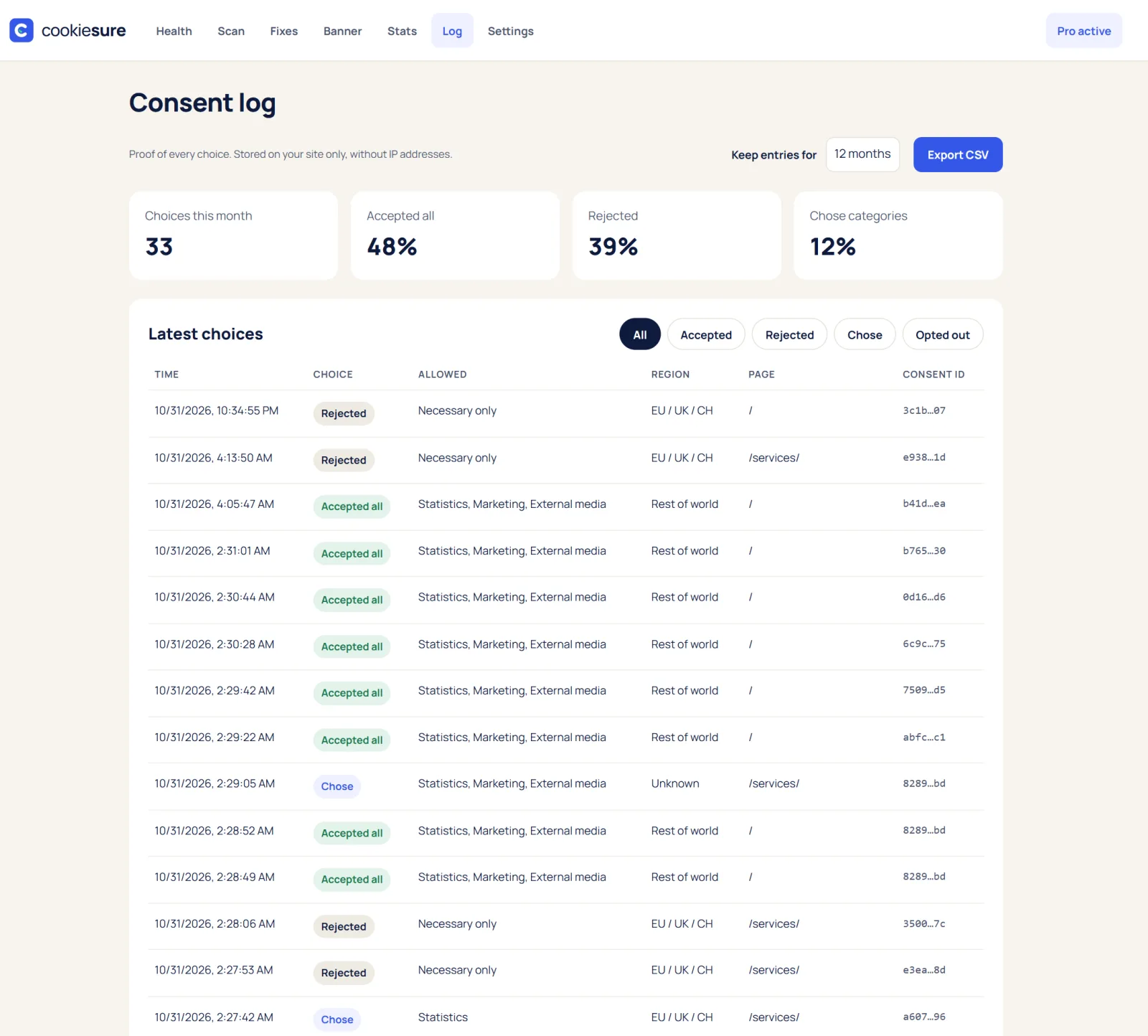
Because Article 7(1) GDPR puts the burden of proof on the site owner, “we had a banner” is not much of an answer if a regulator or a visitor asks. A useful consent record includes:
- A random ID for the choice (it does not need to identify the person).
- Date and time.
- Which categories were accepted or rejected.
- Which version of the banner text and cookie list was shown.
- How the choice was made (Accept, Reject or saved settings).
You do not need IP addresses to prove consent. Keep a dated copy of your banner texts and your cookie list as well, because a log only shows “version 3” if you know what version 3 said.
CookieSure keeps a consent log without IP addresses, with CSV export and a retention period you can set from 3 months to 5 years.
What changes in the UK and the US
United Kingdom
The UK rules sit in PECR and the UK GDPR, and the ICO’s guidance follows the same basic idea as the EU: consent for non-essential cookies, given before they are set, with a clear way to refuse. The Data (Use and Access) Act 2025 changed two things that matter for site owners:
- New exceptions for low-risk uses. Some storage and access no longer needs consent, for example where its only purpose is collecting statistics about how your own service is used, or remembering how a visitor wants the site to look. These exceptions come with conditions, including telling visitors clearly and giving them a simple, free way to object. Advertising and cross-site tracking are not covered.
- Higher fines. The maximum fine for PECR breaches has been raised to UK GDPR levels, a big jump from the old cap of 500,000 pounds.
If you run one banner for both EU and UK visitors, building to the EU standard is the simpler route, since it also meets the UK one.
United States
Most US state privacy laws, led by California’s CCPA as amended by the CPRA, are opt-out rather than opt-in. You can usually load analytics and advertising tags first, but you must tell visitors, offer a clear “Do Not Sell or Share My Personal Information” option where the law applies, and honour opt-out signals such as Global Privacy Control in states that require it. California’s Attorney General settled with Sephora for 1.2 million dollars in 2022, partly over not honouring that signal.
The dark-pattern idea exists in the US too: California’s rules say that consent obtained through dark patterns is not valid, and that opting out should not take more steps than opting in. So the same design habits help on both sides of the Atlantic.
If you are still deciding whether your site needs a banner at all, start with do I need a cookie banner?
Cookie banner rules checklist for WordPress sites
- Find out what loads. Run a scan with the free cookie checker or the CookieSure privacy scan, which opens up to 50 of your pages in your own browser and lists every outside service, cookie and font.
- Remove what you do not need. Self-hosted fonts, click-to-load video embeds and switching off Gravatar or WordPress emoji can shrink the list before you write a single banner text.
- Put Accept and Reject on the first layer, same size, same style, both readable.
- Leave every optional category off by default, and do not add “legitimate interest” toggles for tracking.
- Block tags until consent. Check in a private window with the browser’s Network tab that analytics and ad requests only start after Accept. If you use Google tags, set up Consent Mode v2 correctly.
- Add a permanent way back, such as a floating privacy button or a footer link that reopens the choices.
- Keep proof: a consent log and dated copies of your banner texts and cookie list.
- Set rules per region if you have a mixed audience: ask first in the EU, EEA and UK; opt-out with GPC respected in the US.
CookieSure’s cookie banner is built around these points: Reject is always as big as Accept, categories start off, there is a floating privacy button, and you can set rules per region. Whether your site meets the rules still depends on what it loads and how you configure it.
FAQ
Does the Reject button really have to be on the first layer?
In the EU, a vast majority of the authorities in the EDPB taskforce said a banner with Accept but no reject option is not compliant, and the CNIL has fined large companies for making refusal take more clicks than acceptance. The safest design is Accept and Reject side by side on the first screen.
Can the Accept button be a different colour from Reject?
Yes, regulators have not set a single colour standard. The problem is design that is obviously misleading, such as a reject option that is hard to see or hard to read, so keep both buttons equally visible.
Is a cookie wall ever allowed?
The EDPB says consent forced by a cookie wall is not freely given, while some national authorities assess walls case by case when a fair alternative is offered. For most small sites, the simplest answer is to let visitors use the site after rejecting.
How long should I remember a visitor’s choice?
There is no fixed legal period. The CNIL recommends around six months for both acceptance and refusal, and you should ask again whenever you add new purposes or services.
Do US visitors need the same banner as EU visitors?
Not necessarily. Most US state laws are opt-out, so you can usually load tags first but must offer a clear opt-out and, in some states, honour Global Privacy Control signals.
This article explains how the technology works and is not legal advice.
One useful guide a month
New privacy guides for WordPress, straight to your inbox. No spam, unsubscribe any time.
The CookieSure team builds a privacy-first cookie plugin for WordPress and writes about privacy you can actually set up.