- Cookie-based analytics usually need opt-in consent in the EU and UK, so every visitor who clicks Reject disappears from your reports.
- Cookieless analytics count visits with a hash that changes every day and store nothing on the visitor’s device, so you get reliable daily totals but no long-term visitor history.
- “Cookieless” does not automatically mean “no consent needed”: regulators look at what you read from the device, why, and who gets the data.
Cookieless analytics count page views and visitors without putting a cookie or any other identifier on the visitor’s device. Instead, the server combines a few pieces of request data with a secret that changes every day, turns them into a one-way hash, and throws the raw data away. You get dependable numbers for each day, and in return you give up the ability to recognise the same person next week.
This guide explains why site owners in the US, UK and EU are switching, how the counting actually works, what you can and cannot measure, what regulators say, and how to set it up on a WordPress site.
Why cookie-based analytics cost you data
Classic analytics tools put a cookie with a random ID in the visitor’s browser. When the visitor comes back, the tool reads the cookie and knows it is the same browser. That is how it counts returning visitors, sessions across days and which campaign brought someone in three weeks ago.
In the EU, storing or reading information on a visitor’s device is governed by Article 5(3) of the ePrivacy Directive. The rule is simple: you need consent, unless the storage is strictly necessary for a service the visitor asked for. Analytics cookies are generally not seen as strictly necessary, so most of them need opt-in consent before they are set. The UK has the same starting point in its own law (PECR), with a newer exception for statistics that we cover below.
The consent gap
Once you show a fair cookie banner, with Reject as easy as Accept, a share of visitors will say no. Those visitors are not counted at all by a cookie-based tool. How large that share is varies a lot by audience, country and banner design, so look at your own consent log rather than trusting a number from someone else’s site.
The result is a blind spot. A bakery site might see 600 visits a day in its cookie-based tool while its server handles far more. The missing visitors are not random either: privacy-conscious people and some browsers are more likely to refuse, so the data you do get is skewed.
How cookieless analytics count visitors
The trick is to recognise a visitor for a short time without storing anything on their device and without keeping a permanent ID on the server.
- A visitor requests a page. The server already receives some technical data with every request: the IP address, the browser’s user agent string and the page address.
- The analytics code combines a few of these values with the site’s own domain and a secret salt that is created fresh every day.
- It runs the result through a one-way hash function, which turns it into a string like
9f2c…e71a. You cannot turn the hash back into the IP address. - The raw IP address is not saved. Only the hash and the page view are stored.
- At midnight the salt is replaced and the old one is deleted. Tomorrow the same visitor produces a completely different hash.
Within one day, the same browser on the same network always produces the same hash, so the tool can tell “five page views by one visitor” from “five visitors”. Across days, the link is gone on purpose. Even the site owner cannot match today’s visitor to yesterday’s.
hash = sha256( daily_salt + site + ip + user_agent )
// salt rotates every 24 h, raw IP is never written to the database
What is not involved
A well-built cookieless tool sets no cookie, uses no localStorage or sessionStorage, and does not build a browser fingerprint from things like screen size, installed fonts or canvas drawing. That last point matters: some tools marketed as “cookieless” replace the cookie with a fingerprint that is stable for months. That is still tracking, just harder to see, and it is not what this article means by cookieless analytics.
What cookieless analytics can and cannot measure
Because the identifier lives for one day at most, some reports stay accurate and others become impossible. Here is the honest picture.
| Metric | Cookie-based analytics | Cookieless analytics |
|---|---|---|
| Page views | Only visitors who accepted | All visitors (minus blockers) |
| Unique visitors per day | Yes, for consenting visitors | Yes, approximate |
| Unique visitors per month | Yes | No, only a sum of daily visitors |
| New vs returning visitors | Yes | No |
| Sessions within a visit | Yes | Yes, within the same day |
| Top pages, entry pages, bounce rate | Yes | Yes |
| Referrers and UTM campaigns | Yes | Yes, for the landing visit |
| Multi-day attribution | Yes | No |
| Country, device, browser | Yes | Yes |
| Cross-device or logged-in user journeys | Possible | No |
Unique visitors: daily yes, monthly no
If one person visits on Monday and again on Thursday, a cookieless tool counts two daily visitors. Monthly “unique” figures are therefore a sum of daily uniques and will look higher than the same number in a cookie-based tool. That is not an error, it is the price of not tracking people over time.
The same visitor can also be counted twice in one day if their IP address changes, for example when a phone switches from Wi-Fi to mobile data. Several people behind one office or school IP with the same browser version may be counted as one. Both effects are usually small for a typical small business site.
Attribution
Cookieless analytics can tell you that a visit came from a newsletter link or a Google search, and which page that visitor saw. What it cannot do is connect a newsletter click on Monday to a contact form sent on Friday. If you need multi-day attribution, you need an identifier that lives longer than a day, and that usually means consent.
Do cookieless analytics need consent? What regulators say
This is where many blog posts go wrong. “No cookie” is not a legal category. EU regulators look at whether you store or read information on the visitor’s device, for what purpose, and who receives the data. The answer can differ between the EU, the UK and the US.
EU: the ePrivacy rule is not only about cookies
The European Data Protection Board’s Guidelines 2/2023 on the technical scope of Article 5(3) make clear that the consent rule covers “similar technologies”, not just cookies. Fingerprinting and other ways of reading information from a device can fall under it. A tool that avoids cookies but quietly reads a long list of device properties is not automatically outside the rule.
A daily-hash tool that only uses data the browser sends with every normal page request is in a much better position, and the GDPR still applies to the processing of IP addresses on your server. That is one reason a tool that never stores the IP, and that keeps data on your own server instead of sending it to a third party, is easier to defend.
France: the CNIL audience-measurement exemption
France’s regulator, the CNIL, accepts that some audience measurement can run without consent. Its guidance on analytics for websites lists conditions, including:
- the purpose is limited to audience measurement for the site (or A/B testing);
- visitors are informed and can object;
- the data is not combined with other processing, such as customer files or statistics from other sites;
- tracking stays within one publisher’s site or app;
- the last byte of the IP address is removed;
- trackers have a limited lifetime (13 months).
The CNIL also notes that many large analytics offerings do not qualify, whatever their settings. The exemption is a French position, and other EU regulators do not all apply the same list, so do not treat it as an EU-wide green light.
UK: the statistical purposes exception
The Data (Use and Access) Act 2025 added new exceptions to PECR, and the ICO has published guidance on how the new exceptions work. One exception covers storage or access whose sole purpose is collecting statistics about how your service is used, so you can improve it. The ICO reads it narrowly: you must give clear information, offer a simple, free way to object, and the exception falls away if the same technology is also used for advertising or other purposes.
US: notice and opt-out
US state laws such as California’s generally do not require opt-in consent for first-party analytics. They focus on disclosure, the sale or sharing of personal data, and honouring opt-out signals. First-party cookieless stats that never leave your server rarely cause problems there, but your privacy policy should still describe them.
Cookieless analytics options for WordPress
There are two broad ways to get cookieless analytics on a WordPress site.
Self-hosted stats inside a plugin
The counting runs on your own server and the numbers live in your WordPress database. Nothing is sent to an outside company, there is no extra account, and you can see the dashboard inside wp-admin. The trade-off is that the data uses some space in your database and very large sites may want to watch server load.
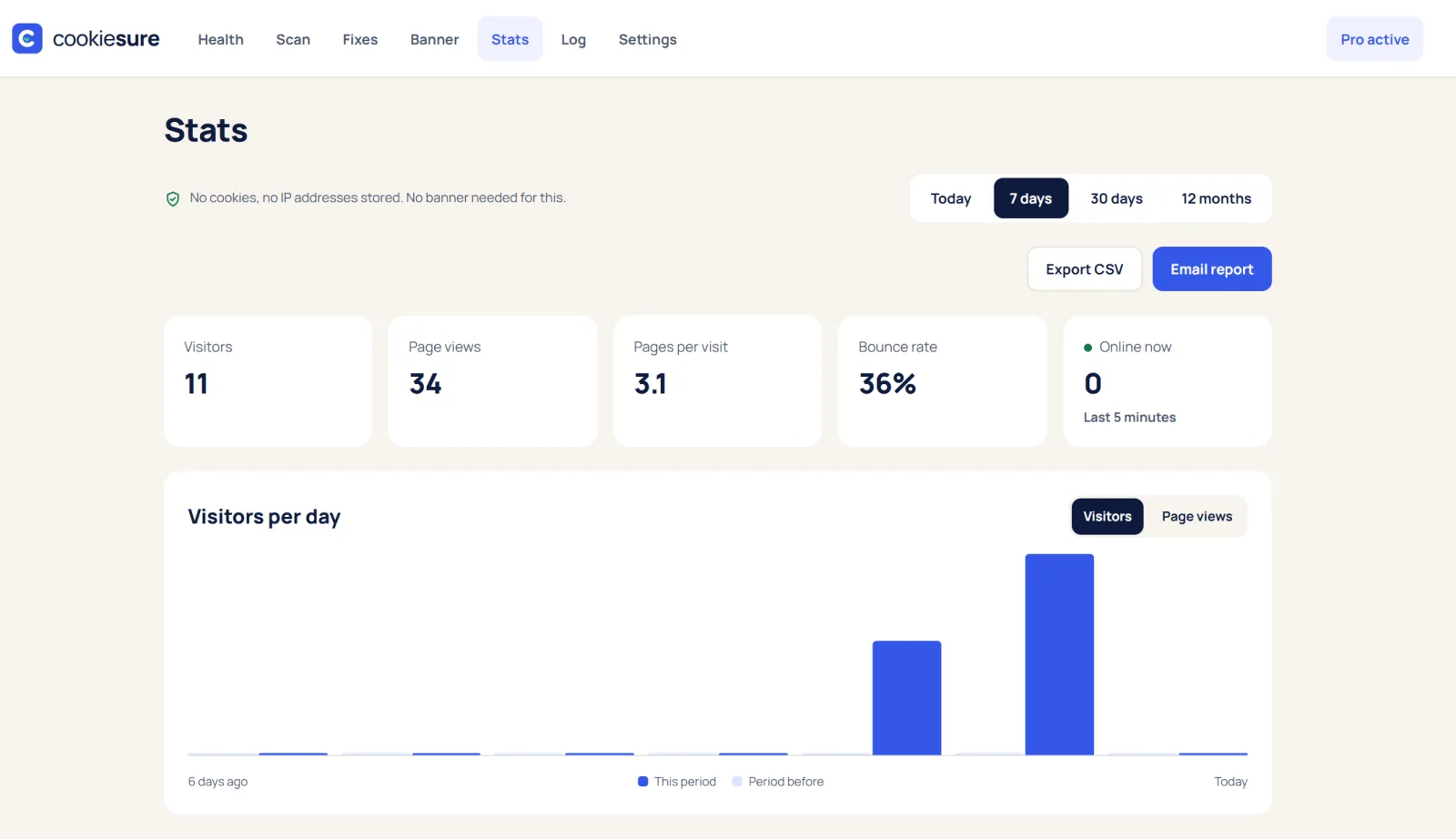
CookieSure is one example. Its cookieless stats are on by default and show visitors, page views, bounce rate, time on page, who is online, top and entry pages, sources, countries, devices, browsers and systems. It counts with a daily-changing hash, sets no cookie, uses no browser storage and does not store IP addresses.
Privacy-focused hosted tools
Several hosted services offer cookieless analytics with a small script and a dashboard on their own site. They are easy to share with a team and handle large traffic without touching your server. Before you choose one, check where its servers are, whether it acts as your processor under a data processing agreement, whether it uses any fingerprinting, and how long it keeps data.
Keeping Google Analytics as well
Some sites run cookieless stats for everyone and keep Google Analytics only for visitors who accept. If you do that, load Google Analytics through your banner and set up Google Consent Mode v2 so Google’s tags respect the visitor’s choice.
How to compare cookieless analytics with Google Analytics
When you run both side by side, the numbers will not match. That is expected. Here is how to read the difference.
- Page views: the cookieless tool should usually show more, because it also counts visitors who rejected cookies. The gap gives you a rough idea of how much your consent banner hides.
- Daily visitors: compare day by day, not month by month. Monthly uniques in a cookieless tool are a sum of daily figures, so they are higher by design.
- Returning visitors and multi-day journeys: only the cookie-based tool can show these, and only for consenting visitors.
- Bots and blockers: each tool filters bots differently, and ad blockers may block one script but not the other. A self-hosted script on your own domain is less often blocked.
- Time zones and definitions: make sure both tools use the same time zone, and check how each defines a bounce or a session before comparing.
The useful question is not “which number is right” but “are the trends the same”. If both tools show the same pages rising and falling, you can trust the cookieless numbers for day-to-day decisions.
Cookieless analytics setup checklist
- Decide what you need. If daily traffic, top pages, sources and devices are enough, cookieless analytics alone may cover you. If you need multi-day attribution, plan a consent-based tool on top.
- Check the method. Confirm the tool sets no cookie, uses no browser storage, does not fingerprint and rotates its salt at least daily.
- Keep data close. Prefer self-hosted stats or a hosted tool with an EU or UK data location and a data processing agreement.
- Do not store full IP addresses. Use a tool that discards or truncates them.
- Do not combine the data with your CRM, ad platforms or other sites, or you may lose any exemption.
- Update your privacy policy. Describe what you count, how, how long you keep it and how visitors can object.
- Scan the site. Make sure the old analytics script is really gone or blocked until consent. The free cookie checker or the CookieSure privacy scan lists every outside service and cookie.
- Review your banner. If cookieless stats were your only reason for a banner, you may be able to simplify it; read do I need a cookie banner before removing one.
- Compare for a month. Run old and new tools side by side and check that the trends match before you switch off the old one.
FAQ
What is cookieless analytics?
Cookieless analytics measure visits without storing a cookie or other identifier on the visitor’s device. Most tools use a short-lived hash of request data with a salt that changes every day, so visitors cannot be followed over time.
Is cookieless analytics GDPR compliant?
It can be much easier to justify than cookie-based tracking, but no tool is compliant on its own. It depends on what data the tool reads, whether IP addresses are stored, where the data goes and how you inform visitors.
Do I still need a cookie banner with cookieless analytics?
Not for the cookieless stats themselves in many cases, but you may still need one for other things such as YouTube embeds, maps, ads or a second analytics tool. Scan your site to see what else loads.
Why are my cookieless numbers higher than Google Analytics?
Mostly because cookieless analytics also count visitors who rejected cookies, and because monthly visitors are a sum of daily visitors. Some differences also come from bot filtering and ad blockers.
Can cookieless analytics show returning visitors?
No. The identifier changes every day by design, so a visitor who comes back tomorrow looks like a new visitor. That is what keeps the method privacy-friendly.
This article explains how the technology works and is not legal advice.
One useful guide a month
New privacy guides for WordPress, straight to your inbox. No spam, unsubscribe any time.
The CookieSure team builds a privacy-first cookie plugin for WordPress and writes about privacy you can actually set up.