- In the EU and UK, you need consent before storing or reading anything on a visitor’s device that is not strictly necessary. That covers cookies, local storage, pixels and fingerprinting.
- Strictly necessary items, such as a shopping cart or a login session, are exempt. Analytics, ad pixels and most third-party embeds are not.
- The US mostly works on opt-out: if you sell or share personal data, you need a clear way to say no, and in several states you must honor Global Privacy Control.
- The honest way to decide: check what your site loads, remove what you do not need, and ask consent for the rest. Some sites end up with no banner at all.
You need a cookie banner if your WordPress site stores or reads information on a visitor’s device for anything other than what is strictly necessary to deliver the service they asked for, and you have visitors from the EU or UK. In practice that means Google Analytics, the Meta Pixel, ad tags and most YouTube or Maps embeds trigger the need, while a WooCommerce cart or a login cookie does not. If you strip out everything that is not strictly necessary, you may not need a banner at all.
What actually triggers the need for a cookie banner
The name “cookie law” is misleading. In the EU the rule comes from Article 5(3) of the ePrivacy Directive, and in the UK from the Privacy and Electronic Communications Regulations (PECR). Both are about storing information on, or reading information from, a user’s device. Cookies are just the most common way to do that.
The European Data Protection Board made this explicit in its Guidelines 2/2023 on the technical scope of Article 5(3), adopted in final form in October 2024. The guidelines say the rule can also cover:
- Local storage and session storage in the browser.
- Tracking pixels, the tiny images used by ad and email platforms.
- Tracking links that add identifiers to URLs.
- Device fingerprinting and some cases of IP-based tracking.
So “we do not use cookies” is not the end of the question. If a script reads a device identifier or stores a value in local storage for tracking, the same consent rule applies.
Where the GDPR comes in
The ePrivacy rule is about the device. The GDPR is about personal data, and an IP address usually counts. Whenever a visitor’s browser loads a file from a third party, such as a font, a video player or a script, that third party receives the visitor’s IP address. You need a legal basis for that transfer under the GDPR, even if no cookie is set.
This is why a site can have zero cookies and still have a privacy problem. The classic example is Google Fonts loaded from Google’s servers, covered in our Google Fonts and GDPR guide.
What is exempt: strictly necessary cookies
Article 5(3) has two exemptions. The first covers storage used only to carry out the transmission of a communication over a network. The second, the one that matters for most websites, covers storage that is strictly necessary to provide a service the user has explicitly asked for.
The test is narrow. It is about what is needed for the feature the visitor is using, not what is useful for you as the site owner. Typical exempt examples:
- A shopping cart cookie that remembers what the visitor added.
- A login session cookie for a logged-in user.
- Security cookies, for example to block repeated failed logins or protect a form.
- A load-balancing cookie that keeps a visitor on the same server.
- The cookie that remembers the visitor’s consent choice itself.
What is not exempt: analytics, advertising, social media pixels, A/B testing, and third-party embeds that set their own cookies. They may be useful, but the visitor did not ask for them to read an article or buy a product.
Analytics: a few narrow exceptions
Some regulators allow limited room for analytics. France’s CNIL accepts certain audience measurement tools without consent, under strict conditions, such as producing only aggregate statistics for the site itself and not tracking people across other sites. In the UK, the Data (Use and Access) Act 2025 added new PECR exceptions, including one for collecting statistics to improve a site. It comes with conditions: you must tell people clearly and give them a simple, free way to object, and the ICO has published guidance on how it applies.
None of these exceptions is a blanket pass for standard Google Analytics with advertising features switched on. If you want analytics without consent, the safer route is a tool that does not store anything on the device in the first place, like the options in our cookieless analytics guide.
Do I need a cookie banner in the US?
The US has no federal equivalent of the ePrivacy rule. Instead, a growing number of states, starting with California and including Colorado, Virginia, Connecticut, Texas and others, have comprehensive privacy laws. Most of them work on an opt-out model rather than opt-in.
In broad terms:
- The laws apply to businesses above certain size or data-volume thresholds, which differ from state to state. Many small sites fall below them.
- If you “sell” or “share” personal data, which can include letting ad pixels collect data for cross-context behavioral advertising, you must offer a clear way to opt out.
- California and several other states require businesses to honor browser-based opt-out signals such as Global Privacy Control (GPC). A visitor whose browser sends GPC should be treated as having opted out.
So for US visitors the usual pattern is: tracking can load by default, but there must be an easy way to say no, and a GPC signal must be respected. A full “ask first” banner is not usually required, though some sites show one anyway for simplicity.
EU, UK and US rules side by side
| EU / EEA | UK | US (state laws) | |
|---|---|---|---|
| Main rule | ePrivacy Art. 5(3) + GDPR | PECR + UK GDPR | State privacy laws (California and others) |
| Model | Opt-in: ask before loading | Opt-in, with a few new exceptions | Opt-out of sale, sharing and targeted ads |
| Strictly necessary cookies | No consent needed | No consent needed | No opt-out needed |
| Analytics | Consent, except narrow national exemptions | Consent, unless the statistics exception applies | Usually fine; opt-out if data is sold or shared |
| Ad pixels | Consent | Consent | Opt-out link; honor GPC where required |
| Banner needed? | Yes, if anything non-essential loads | Yes, if anything non-essential loads | Not always; an opt-out link may be enough |
Common WordPress examples
The same plugin can behave differently depending on its settings, so treat these as a starting point, not a verdict.
Google Analytics
GA4 sets first-party cookies such as _ga to recognize returning visitors, and sends data to Google. For EU and UK visitors, that needs consent in almost every setup. If you use Google tags, Consent Mode v2 lets them wait for the visitor’s choice; see our Consent Mode v2 for WordPress guide.
Meta Pixel and other ad tags
The Meta Pixel, TikTok Pixel, LinkedIn Insight Tag and similar tools exist to track visitors for advertising. They need consent in the EU and UK and fall under “sharing” for targeted advertising in US state laws.
YouTube, Vimeo and Google Maps embeds
A standard YouTube embed loads Google’s player as soon as the page opens, before the visitor clicks play. That sends the IP address to Google and can store data on the device. A bakery site with one recipe video is enough to trigger the issue. The common fix is click-to-load: show a preview image and only load the player when the visitor clicks. More on this in our YouTube embed and GDPR guide.
Google Fonts
Fonts loaded from fonts.googleapis.com do not set cookies, but they do send the visitor’s IP address to Google. That is a GDPR question rather than a cookie question, and the clean fix is to host the fonts on your own server so no consent is needed.
WooCommerce cart cookies
WooCommerce sets cookies such as woocommerce_cart_hash, woocommerce_items_in_cart and wp_woocommerce_session_ to keep the cart working. These support a service the shopper asked for, so they are generally treated as strictly necessary. Payment gateways and marketing extensions you add on top may be a different story, so check them separately.
WordPress core
WordPress itself sets login cookies for logged-in users and comment cookies only if a commenter ticks the “save my name” box. Those are fine. But core also loads emoji scripts from a WordPress.org CDN and shows Gravatar images from a third-party server, both of which send visitor IP addresses elsewhere. Both can be switched off.
How to find out if your own site needs a cookie banner
Rather than guessing, check what your site actually does. This takes 20 to 30 minutes for a typical site.
- See what loads. Open your site in a private window, open the browser’s developer tools, and look at the Network tab and the Application (or Storage) tab. Note every outside domain, every cookie and anything in local storage. Do this on several page types: home, a blog post, a product, the contact page. Our free cookie checker gives a quick first look.
- Sort each item. For each cookie or service, ask: does the visitor need this for the thing they came to do? Cart, login and security go in the “strictly necessary” pile. Analytics, ads, embeds and social widgets go in the “needs consent” pile.
- Remove what you do not need. Old tracking codes from a campaign two years ago, a chat widget nobody uses, a social share plugin that loads scripts on every page. Deleting is the cheapest compliance step there is.
- Replace what you can. Host fonts locally, switch embeds to click-to-load, turn off Gravatar and emoji scripts, and consider cookieless analytics.
- Ask consent for the rest. Whatever remains in the “needs consent” pile must wait until the visitor agrees. That is the job of the banner, and the scripts must actually be blocked until then, not just announced.
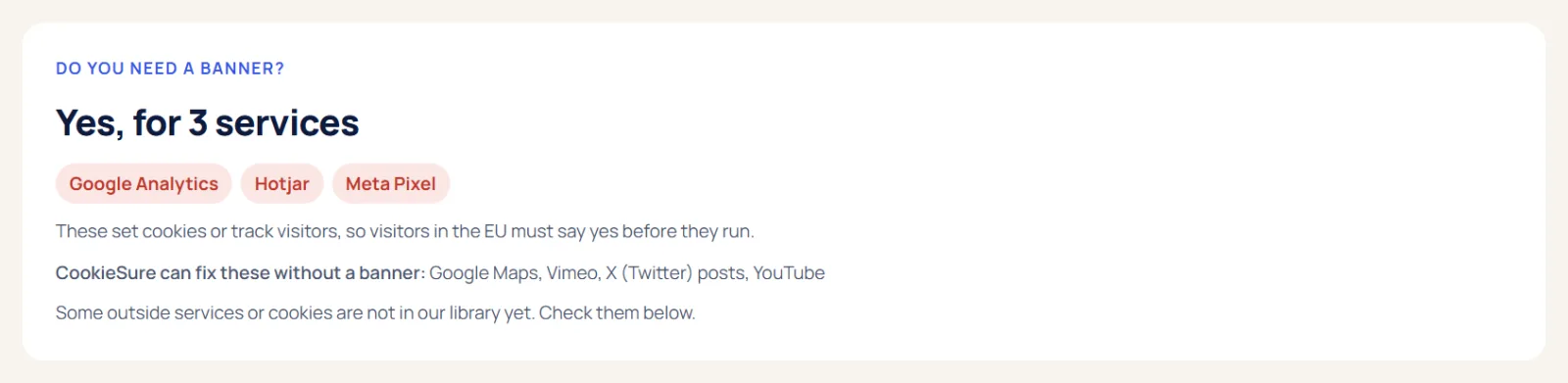
If you would rather not do this by hand, CookieSure’s privacy scan opens up to 50 of your pages in your own browser and lists every outside service, cookie and font it finds, with a suggested fix for each. Many of those fixes, such as hosting Google Fonts locally or making YouTube embeds click-to-load, take one click.
When you can honestly run without a cookie banner
Plenty of WordPress sites do not need a consent banner once they are cleaned up. You can honestly skip it when all of these are true:
- The only cookies or storage on the site are strictly necessary: cart, login, security, and similar.
- No analytics, or analytics that store nothing on the device and do not track people across sites.
- No ad pixels, retargeting tags or social tracking scripts.
- Videos, maps and social posts load only after a click, or are not used.
- Fonts and other files are served from your own domain, not from third-party CDNs.
A local plumber’s site with a contact form, self-hosted fonts and cookieless stats is a realistic example. So is a small WooCommerce shop that uses only core cart cookies and a payment gateway at checkout.
No banner does not mean no transparency. You still need a privacy policy that explains what you collect, and it is good practice to list the strictly necessary cookies you use. CookieSure can build a cookie declaration from the last scan, which you can place on your policy page.
Two caveats. First, these conclusions depend on your exact setup, and a new plugin or theme update can quietly add a third-party script, so check again after changes. Second, if you have US visitors and sell or share their data, you may still need an opt-out link even without an EU-style banner.
If you do need a cookie banner, set it up properly
If your audit leaves items that need consent, a few basics apply across the EU and UK, based on regulator guidance:
- Block first, load after consent. Non-essential scripts must not run until the visitor agrees.
- Make rejecting as easy as accepting. A “Reject all” button on the first layer, as visible as “Accept all”, is the safest design.
- No pre-ticked boxes and no “by scrolling you agree”.
- Let people change their mind later, for example with a small privacy button on every page.
- Keep a record of consent choices so you can show what was agreed.
For the full list, see our cookie banner rules guide. In CookieSure the banner is off until you switch it on, the Reject button is always as big as Accept, and you can set rules per region: ask first in the EU, EEA, UK and Switzerland, and allow with opt-out in the US while respecting Global Privacy Control.
Whatever tool you use, no plugin can make a site compliant by itself. It depends on what your site loads, what you tell visitors, and what you do with the data.
FAQ
Do I need a cookie banner if I only use strictly necessary cookies?
No. In the EU and UK, cookies that are strictly necessary for a service the visitor asked for, such as a cart or a login, do not need consent. You should still explain them in your privacy or cookie policy.
Do I need a cookie banner for Google Analytics?
For EU and UK visitors, almost always yes, because standard Google Analytics stores identifiers on the device and sends data to Google. Cookieless analytics that store nothing on the device are the usual way to avoid it.
Does a site with no cookies need a banner?
Not necessarily, but check for other storage and tracking. Local storage, tracking pixels and fingerprinting fall under the same rule, and third-party files such as fonts send IP addresses to other companies.
Do US websites need a cookie banner?
Usually not an EU-style “ask first” banner. But if you sell or share personal data and fall under a state privacy law, you need a clear opt-out and, in several states, must honor Global Privacy Control signals.
Are WooCommerce cookies strictly necessary?
The core cart and session cookies generally are, because they keep the shopping cart working. Marketing, analytics and some third-party extensions added to a store are not, so check them separately.
This article explains how the technology works and is not legal advice.
One useful guide a month
New privacy guides for WordPress, straight to your inbox. No spam, unsubscribe any time.
The CookieSure team builds a privacy-first cookie plugin for WordPress and writes about privacy you can actually set up.