- A standard YouTube iframe connects the visitor’s browser to Google the moment the page loads, before anyone presses play.
- Privacy-enhanced mode (youtube-nocookie.com) limits personalization and ad targeting, but the player still loads from Google and still receives the visitor’s IP address.
- Click-to-load is the cleanest fix: show a preview image stored on your own site and load the real player only after the visitor clicks.
To embed YouTube videos in a GDPR-friendly way, do not load the YouTube player until the visitor asks for it. Show a placeholder with a preview image hosted on your own server and a clear “Load video” button; only when the visitor clicks does the browser connect to Google. Privacy-enhanced mode helps, but on its own it does not stop the connection.
What a standard YouTube embed loads before play
When you paste a YouTube link into the WordPress editor, WordPress turns it into an <iframe> that points to www.youtube.com/embed/…. An iframe is a small web page inside your page, and the browser loads it straight away, together with the rest of your content. The visitor has not clicked anything yet.
To draw that little player with its title, thumbnail and red play button, the browser fetches files from Google’s servers:
- youtube.com: the embed page itself and the player scripts and styles.
- i.ytimg.com: the thumbnail image shown behind the play button.
- Other Google domains, such as the one that serves the channel avatar, plus, depending on the video and its ads, advertising domains like
doubleclick.net. - googlevideo.com: the actual video stream, which normally starts once the visitor presses play.
Every one of those requests carries the visitor’s IP address, the address of the page they are on (often in the referrer), and details about their browser. On the standard youtube.com domain, the player can also read and set YouTube cookies. Google’s own cookie overview lists cookies such as YSC (a session security cookie) and VISITOR_INFO1_LIVE, which it describes as used for analytics, recommendations and advertising on YouTube.
youtube, ytimg, google and doubleclick.Picture a bakery site with a sourdough video on the home page. Every visitor, including those who scroll past the video, sends their IP address to Google. That is the part GDPR cares about.
What youtube-nocookie.com does and does not do
YouTube offers a privacy-enhanced mode. You switch it on by changing the embed domain from www.youtube.com to www.youtube-nocookie.com, for example https://www.youtube-nocookie.com/embed/VIDEO_ID. The name suggests the problem is solved. It is not quite.
According to YouTube’s own help page on embedding videos, privacy-enhanced mode means that views of the embedded video are not used to personalize the viewer’s YouTube browsing experience, ads shown in the embed are non-personalized, and the views are not used to personalize advertising shown to the viewer outside your site. The page also notes that if the viewer clicks through to another site or app from the embed, that destination may track them under its own policies.
What it does not change
- The connection still happens. The player is still loaded from a Google domain as soon as the page opens, so the visitor’s IP address still reaches Google.
- Browser storage is not ruled out. Google’s help page talks about personalization and ads; it does not promise that nothing is stored on or read from the visitor’s device. Independent tests have reported entries in the browser’s local storage and IndexedDB from the nocookie player, and cookies once the video plays.
- Thumbnails still come from Google. The preview image is still fetched from
i.ytimg.com. - Playback is the normal YouTube stream. Once the visitor presses play, the video streams from Google’s servers like any other YouTube video.
So privacy-enhanced mode is a good improvement and you should use it whenever you embed YouTube. It is just not a substitute for asking first.
Why YouTube embeds raise GDPR and consent questions
Two sets of rules are involved in the EU, and the UK has close equivalents.
The ePrivacy rule on devices
Article 5(3) of the ePrivacy Directive says that storing information on a user’s device, or accessing information already stored there, needs the user’s consent, unless it is strictly necessary for a service the user asked for. In the UK the same idea sits in PECR. The rule is not limited to cookies. The EDPB, the body of EU data protection regulators, explains in its Guidelines 2/2023 on the technical scope of Article 5(3) that local storage, tracking pixels and similar techniques can also fall under it.
A YouTube player that sets cookies or writes to local storage on page load does this before the visitor has asked for any video. It is hard to argue that this is “strictly necessary” for a service the visitor requested.
The GDPR on personal data
Under the GDPR, an IP address is usually personal data. Passing it to Google needs a legal basis, and Google is a US company, so international transfer rules come into play as well. You can argue about whether “legitimate interest” covers showing a video, but you cannot easily argue it for visitors who never watch it. This is the same reasoning that made Google Fonts a GDPR issue.
US and the rest of the world
In the US there is no general opt-in rule for cookies. State privacy laws such as California’s mainly give visitors a right to opt out of the “sale” or “sharing” of their data for advertising, and some expect sites to honor signals like Global Privacy Control. Click-to-load is not strictly required there, but it is a simple way to keep advertising-related requests away from visitors who never watch the video.
How click-to-load (two-click) embeds work
Click-to-load, also called a two-click embed or a facade, swaps the live iframe for a harmless placeholder until the visitor makes a choice.
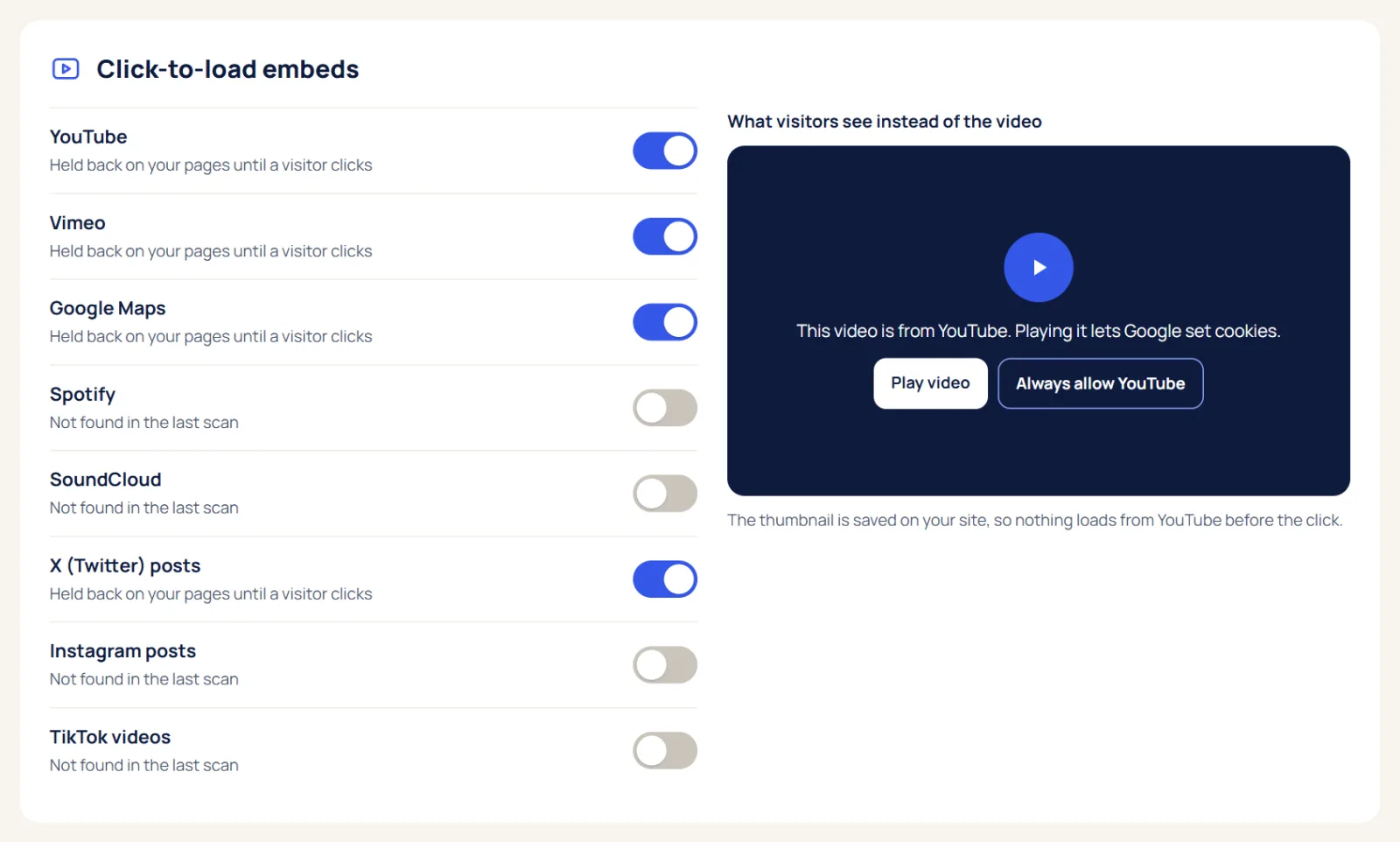
- Page load: your page shows a box the size of the video, with a preview image, the video title, a play-style button and one short line such as “Playing this video loads content from YouTube (Google).”
- First click: the visitor clicks “Load video”. Only now does a small script replace the placeholder with the real iframe, ideally pointing at
youtube-nocookie.com. - Second click: the visitor presses play in the YouTube player. Many setups add
autoplay=1so the video starts straight away and the visitor only has to click once.
The important detail is the preview image. If the placeholder pulls its thumbnail from i.ytimg.com, the visitor’s IP address still goes to Google on page load, and you have only moved the problem. A good click-to-load setup downloads the thumbnail once and serves it from your own server.
Some setups also tie the placeholder to a cookie banner category, so a visitor who already agreed does not have to click on every video.
A minimal hand-made version
If you want to see the idea in code, this is the core of it. The thumbnail lives on your server and the iframe is only created after the click:
<div class="yt-facade">
  <img src="/wp-content/uploads/video-sourdough.jpg" alt="">
  <button type="button" data-id="VIDEO_ID">
    Load video: How we make our sourdough
  </button>
  <p>Loads content from YouTube (Google). See our privacy policy.</p>
</div>
A few lines of JavaScript then listen for the button click and replace the box with <iframe src="https://www.youtube-nocookie.com/embed/VIDEO_ID?autoplay=1" title="How we make our sourdough" allow="autoplay; encrypted-media" allowfullscreen>.
YouTube GDPR options in WordPress
There are four common ways to handle YouTube on a WordPress site. They differ in effort and in how much they share before the visitor decides.
1. Thumbnail and link
Upload a screenshot of the video to your Media Library, link it to the video on youtube.com and add a caption like “Watch on YouTube”. Nothing loads from Google until the visitor clicks and leaves your site. It is the most private option, but visitors leave your page to watch.
2. Privacy-enhanced mode
Use youtube-nocookie.com in the embed URL. In WordPress you can do this with a Custom HTML block that holds the iframe, and some page builders offer a “privacy mode” switch in their video widget that does the same. It reduces personalization and ad targeting, but as explained above, the player still loads from Google on page load.
3. Click-to-load with a plugin
A plugin finds YouTube embeds in your posts and pages and swaps them for placeholders automatically. In CookieSure, click-to-load is one of the one-click fixes: it covers YouTube, Vimeo, Google Maps, Spotify, SoundCloud, X, Instagram and TikTok embeds, stores YouTube and Vimeo preview images locally on your site, and works with the Elementor video widget. The privacy scan shows you which pages contain embeds before you switch it on.
4. Consent-gated embeds
Here the embed stays blocked until the visitor accepts a matching category in your cookie banner. It works, but a visitor who rejects cookies sees an empty box unless the placeholder also offers its own “Load video” button. The best setups combine both: the banner choice unlocks all embeds at once, and the placeholder lets anyone load a single video when they want it. If you use a banner, see how the CookieSure banner works.
| Option | Contacts Google on page load | Video plays on your page | Effort |
|---|---|---|---|
| Standard youtube.com embed | Yes, may also set cookies | Yes | None |
| Privacy-enhanced mode | Yes, with limits on personalization | Yes | Low |
| Thumbnail and link | No | No, opens YouTube | Low, per video |
| Click-to-load, local preview | No, only after a click | Yes | Low with a plugin |
| Consent-gated by banner | No, only after consent | Yes, after consent | Medium |
Vimeo, Google Maps and other embeds
YouTube is the most common case, but every embedded service works the same way: an iframe loads from someone else’s server and the visitor’s browser talks to it directly.
- Vimeo offers a “do not track” player parameter (
dnt=1) that stops the player collecting session data and analytics, although Vimeo says some essential cookies remain. The player still loads from Vimeo, so the IP address still reaches Vimeo. Click-to-load with a local preview image is the stronger option. - Google Maps has no privacy-enhanced mode. An embedded map loads from Google as soon as the page opens. A static image of your location with a “Get directions” link, or a click-to-load placeholder, avoids that. Your address in plain text is useful for everyone anyway.
- Spotify, SoundCloud, X, Instagram and TikTok embeds all load scripts or iframes from their own servers. The same placeholder pattern applies.
Not sure what your site embeds? A quick check with the free cookie checker lists the outside services your pages contact.
Make the placeholder accessible
A placeholder replaces content, so it needs to work for everyone, including keyboard and screen reader users.
- Use a real
<button>. Not a<div>with a click handler. A button can be reached with the Tab key and activated with Enter or Space. - Give it a useful name. “Load video: How we make our sourdough” tells a screen reader user what they get. A lone play icon or “Click here” does not.
- Treat the preview image correctly. If the button text already names the video, the image is decorative and can have an empty
alt="". If it carries information, describe it. - Explain what happens. One short sentence saying the video loads from YouTube and links to your privacy policy is enough. Keep the contrast of that text readable over the image.
- Keep a visible focus outline on the button, and make it large enough to tap on a phone.
- Handle focus after the click. When the iframe replaces the placeholder, move focus to it so keyboard users do not land back at the top of the page, and give the iframe a
titlethat names the video. - Offer captions or a short text summary for visitors who choose not to load the video.
YouTube GDPR checklist for your site
- Find every page with a video, map or social embed. Check posts, pages, widgets, page builder templates and the footer.
- Open a few of those pages in a private window with the Network tab open and note which outside domains load before you click anything.
- Decide per embed: replace it with a thumbnail and link, or put it behind click-to-load.
- Use
youtube-nocookie.comfor every YouTube player that does load. - Make sure the placeholder’s preview image is served from your own domain, not from
i.ytimg.com. - Check the placeholder with the keyboard only: Tab to it, press Enter, and confirm the video loads.
- Clear your cache plugin, hosting cache and CDN, then repeat the Network tab check. Nothing from Google should load until you click.
- List YouTube, Vimeo or Google Maps in your privacy policy and cookie declaration, and explain that they load only on request.
- If you use a cookie banner, link the embeds to a matching category so a visitor’s choice is respected everywhere.
None of these steps guarantees compliance on its own; that depends on everything else your site loads. Together they remove a common reason a page talks to Google before the visitor says yes.
FAQ
Is embedding YouTube videos illegal under GDPR?
No. The issue is that a standard embed contacts Google and may store data on the visitor’s device before they choose to watch. Loading the player only after a click, or after consent, addresses that.
Is youtube-nocookie.com enough for GDPR?
Usually not on its own. Google says privacy-enhanced mode stops embed views from being used for personalization and personalized ads, but the player still loads from Google on page load and receives the visitor’s IP address.
Does clicking play count as consent?
Pressing play inside a YouTube player that has already loaded comes too late, because the connection has already happened. A click on your own placeholder, with a short note that the video loads from YouTube, happens before anything is sent.
Do I need click-to-load if my visitors are only in the US?
US law has no general opt-in rule for embeds, so it is usually not required. It still keeps advertising-related requests away from visitors who never watch the video and often makes pages load faster.
Will click-to-load hurt my video views or SEO?
Views count when people play the video, which still works with one extra click. Pages often get lighter because the YouTube player is not loaded for every visitor, and a text summary under the video keeps the content readable for search engines.
This article explains how the technology works and is not legal advice.
One useful guide a month
New privacy guides for WordPress, straight to your inbox. No spam, unsubscribe any time.
The CookieSure team builds a privacy-first cookie plugin for WordPress and writes about privacy you can actually set up.